
Decorise AI, Design Your Space
Bilge Bulut MobileHouse & Home
4.20.00 Reviews
- Version
- 1.4
- Installs
- 10.00K
- Age Rating
- Everyone
Screenshots
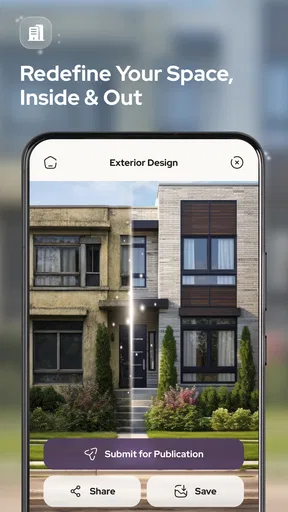
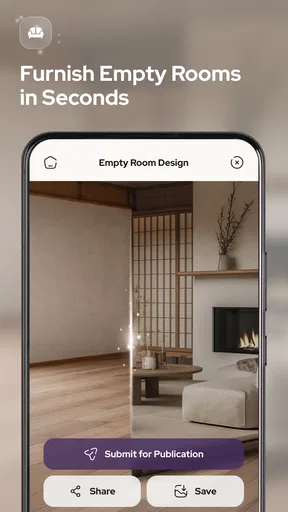
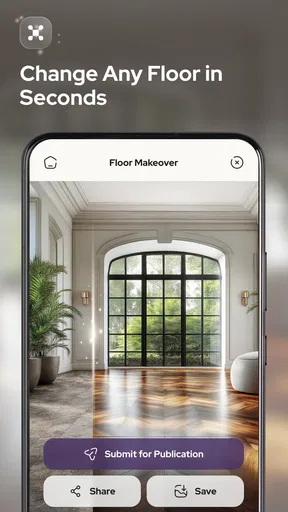
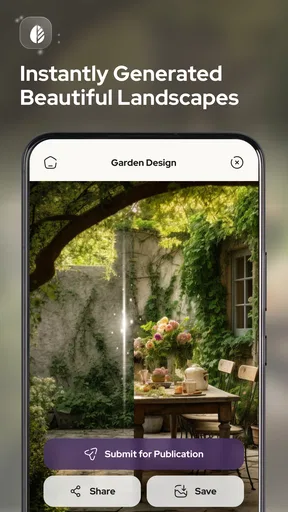
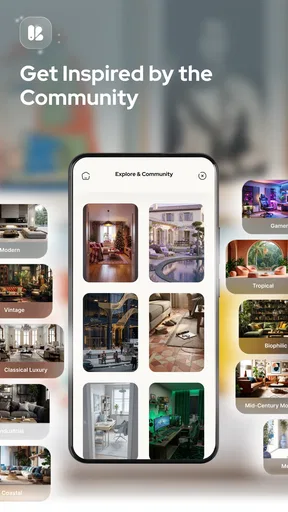
Our Review of Decorise AI, Design Your Space
 Analysis by Appyee
I approached Decorise AI as a practical home-planning tool rather than a replacement for an interior designer. Its appeal is straightforward: you start with a room, outdoor area, or home exterior, then use artificial intelligence to explore visual directions quickly. In my experience, that makes it most useful during the uncertain stage when you know a space feels wrong but cannot yet explain what should change.
The app sits in the House & Home category and is developed by Bilge Bulut Mobile. It is free to install, available for Everyone, and has reached over 10K installs with a 4.2 average from around 40 ratings. Those numbers suggest a small but interested user base, so I see it as an accessible idea generator rather than a mature professional platform with a large design community behind it.
What I liked immediately was the speed of visual experimentation. Instead of collecting separate inspiration images and trying to imagine how they might apply to my own room, I could use the app to move toward a more personal reference. That distinction matters. A beautiful photograph of somebody else’s living room may inspire me, but a generated concept based on my own space gives me something more useful to discuss with a decorator, builder, partner, or furniture retailer.
How I use Decorise AI from the first idea to a workable direction
I use Decorise AI as a way to turn a vague home-design problem into a shortlist of visual directions. I start with one space and one question, then judge each concept against what I actually need from the room rather than choosing the prettiest image. That keeps the process useful and makes it easier to spot where the next step is a real-world check, not another round of inspiration.
Start with a clear baseline, not a fantasy makeover
The best workflow begins with a realistic question. I would not start by asking myself to create the perfect home. I would start with a specific problem: the room feels dark, the furniture arrangement is awkward, the front of the house looks dated, or the garden has no clear purpose. A focused goal gives the generated result a job to do.
For a living room, I might begin by deciding whether I want to investigate color, furniture mood, lighting atmosphere, or overall style. If I try to solve all four at once, the result becomes harder to judge. A room can look attractive while still failing to answer the practical issue that led me to open the app.
This is one of the app’s strongest everyday uses. It helps turn vague dissatisfaction into a visual conversation. I can show a household member two or three different directions and ask which one feels closer to our routines. That is more productive than arguing over isolated words such as “modern,” “warm,” or “minimal,” because those words mean different things to different people.
I also found it important to treat the first result as a starting point, not a final plan. An AI-generated image can suggest a palette or atmosphere, but it should not be treated as proof that a particular sofa will fit, that a wall can be removed, or that a garden layout is suitable for the local conditions. The app is valuable for creative comparison; it is not a measuring tool or a building authority.
A realistic weekend scenario
Imagine that I am preparing to refresh a small bedroom before a guest arrives. I do not need a complete renovation plan. I need to decide whether the room should feel brighter, calmer, or more spacious. I can use Decorise AI to explore a lighter visual direction, then compare it with a warmer version that keeps the room comfortable rather than stark.
After choosing the direction I prefer, I would separate inspiration from decisions. The image might suggest pale walls, simpler bedding, and less visual clutter. My actual shopping list would then contain only items I can verify: paint samples, a lamp, storage, or textiles. This two-step habit prevents the common mistake of treating every attractive detail in an AI image as something that must be purchased.
The same approach works outdoors. For a garden, I would use the app to compare moods such as a relaxed seating area, a more structured planting arrangement, or a cleaner low-maintenance look. I would then check sunlight, drainage, access, and maintenance separately. The visual concept helps me choose a direction, while real-world checks decide whether that direction is sensible.
Why the exterior and garden options matter
Many home-design apps concentrate almost entirely on interiors. Decorise AI is more interesting when I use it across the whole property: inside rooms, the outside face of the home, and the garden. That wider scope is useful when one area affects another. A new exterior color should not feel disconnected from the hallway, and a garden seating area should make sense alongside the home’s architecture.
For an exterior concept, I would use the output to compare broad visual choices rather than rely on exact construction details. The app can help me think about whether the property feels traditional, contemporary, understated, or more expressive. It can also provide a useful conversation starter before I ask a professional about materials and feasibility.
For gardens, the trade-off is even clearer. A generated image may make a planting scheme look effortless, but real gardens involve climate, soil, water, growth patterns, and ongoing work. I would use the app to decide what atmosphere I want, then translate that atmosphere into plants and surfaces with advice from a local source. This is a concrete way to benefit from the app without allowing an attractive image to dictate an impractical plan.
Settings and choices worth checking before judging a result
When an output feels wrong, I would resist blaming the whole app immediately. The first thing to check is whether my starting idea was too broad. “Make my room beautiful” is not a useful design brief. “Create a brighter reading corner while keeping the room comfortable” gives me a better basis for judging what appears.
I would also keep the evaluation consistent. If I compare one concept for color and another for furniture layout, I am not really comparing alternatives. Experienced use means changing one major direction at a time. I might keep the desired mood steady while testing different palettes, or keep the palette steady while considering a different arrangement. This makes the app’s visual exploration much more informative.
Another useful habit is to save or record the ideas that genuinely solve the original problem, rather than collecting every appealing image. Too many possibilities can create decision fatigue. I prefer a small shortlist: one safe direction, one more ambitious direction, and perhaps one option that balances the two. The app becomes more helpful when I use it to narrow choices instead of endlessly generating them.
Because the current version is 1.4 and the app is free with optional in-app purchases ranging from $4.99 to $39.99 per item, I would pay attention to the point at which the free experience stops being enough for my project. I would not purchase anything simply because a result looks attractive. I would first decide whether the extra value supports a real decision I need to make. That approach keeps the app affordable as an experiment rather than turning inspiration into an uncontrolled expense.
Faster patterns for repeat use
The quickest way to get value is to create a repeatable order of operations. I would begin with the space and its main problem, explore a limited number of visual directions, identify the details that appear consistently in the best concepts, and then check those details against the real room. This is faster than changing everything randomly between attempts.
For example, if several promising concepts share a lighter wall treatment and a less crowded arrangement, that repeated pattern is more useful than one dramatic image with an unusual decorative object. Repetition does not prove that the idea is correct, but it tells me which elements are worth investigating outside the app.
I would also separate “style research” from “purchase research.” Decorise AI can help me discover that I prefer soft contrast, natural-looking textures, or a more open arrangement. Once I know that, I can search for actual products elsewhere. This prevents the app from becoming a shopping substitute when my real need is clarity.
A second fast pattern is to use the app before visiting stores or speaking with tradespeople. A short visual shortlist can make those conversations more precise. Instead of saying that I want something modern but cozy, I can explain which visual qualities I am trying to preserve and which ones I want to avoid. Even if the generated image is not technically exact, it can improve the quality of the discussion.
A third pattern is especially helpful for shared homes: ask each person to choose a preferred direction independently, then compare the reasons rather than only the images. One person may care about brightness, another about storage, and another about a calm atmosphere. The app exposes those priorities quickly, which can save time before any money is spent.
Where the app reaches its limits
My main reservation is that visual confidence can be misleading. A polished concept may hide the awkward parts of a real room: uneven walls, limited outlets, narrow walkways, poor natural light, or furniture that cannot be moved. I would never use an attractive result as evidence that a renovation is technically possible.
The same caution applies to scale. Unless I verify dimensions independently, I cannot assume that the proportions shown will match my space. A chair that looks perfectly placed in an image may block a door in real life. A garden path may appear generous while being too narrow for practical use. The app helps me imagine; it does not replace a tape measure, floor plan, site visit, or professional assessment.
There is also a creative limitation. AI-generated design can encourage familiar, visually safe combinations. If I want a highly personal room built around unusual furniture, a specific cultural style, or a carefully preserved collection, a human designer or a more detailed planning tool may understand the brief better. Decorise AI is strongest when I want to explore a direction quickly, not when I already have a strict technical specification.
Privacy is another sensible consideration whenever I use a home-visualization app. I would avoid including personal documents, identifiable people, valuables, or details that are irrelevant to the design task. A simple, well-framed image of the space is usually a better starting point than a casual photograph containing private information. This is a practical habit regardless of how much of the design process happens on a phone.
Who should use it, and who should choose something else?
I would recommend Decorise AI to renters who want to test decorating directions before buying removable items, homeowners at the brainstorming stage, couples trying to agree on a style, and anyone who struggles to convert inspiration boards into ideas for their own property. It is also useful for people preparing an initial conversation with an interior professional because it gives them visual language.
I would be more cautious about recommending it to someone who needs exact furniture dimensions, a construction-ready plan, a detailed materials schedule, or reliable horticultural guidance. In those situations, a floor-planning application, a product-specific room planner, an architect, an interior designer, or a local gardening specialist is likely to be the better choice.
It is also not the right tool for someone who dislikes visual experimentation or already knows precisely what they want. If the brief is fixed down to measurements, materials, and layout, fast AI concepts may add noise rather than save time. The app earns its place when uncertainty is the problem.
My verdict after building a repeatable habit
Decorise AI works best when I use it with discipline. The app can make the early design process more approachable, especially when I need to compare interior, exterior, and garden ideas without spending days assembling references. Its strongest contribution is not a finished renovation plan; it is the ability to help me recognize what kind of space I actually want.
The free entry point makes it easy to try, while the optional purchases mean I would keep an eye on how often I use the service and what I genuinely need from it. The Everyone age rating also makes it suitable as a household discussion tool, although technical and financial decisions still require adult judgment and real-world verification.
Bilge Bulut Mobile has positioned the app around quick visual exploration, and that is exactly how I would use it. I would start with one problem, change one major idea at a time, keep a short list of useful directions, and verify every practical detail outside the generated concept. That workflow turns a potentially distracting novelty into a focused planning aid.
My final recommendation is positive but specific: try it if you want help finding a direction for a home project, particularly across rooms, exteriors, and gardens. Skip it if you need precise technical planning or a substitute for professional advice. The best results come from treating the images as informed prompts for better decisions, not as instructions to follow blindly.
Verdict
Strengths of Decorise AI, Design Your Space
- Generates room concepts quickly from uploaded photos.
- Useful for exploring multiple interior styles before decorating.
- Can help visualize color palettes and furniture arrangements.
- Simple interface makes experimentation accessible to beginners.
- Provides inspiration when you are unsure how to style a room.
Limitations of Decorise AI, Design Your Space
- AI results may distort room dimensions or architectural details.
- Some features or designs may require a subscription or credits.
- Generated furniture may be unavailable from real retailers.
- Results can look repetitive when prompts or photos are similar.
- A stable internet connection is needed for most AI processing.
Other Releases by Bilge Bulut Mobile
View All
Cartoon Photo Editor-Toon Art
Art & Design4.0

Radar, GPS & Speedometer - USA
Maps & Navigation4.0
Similar Picks in This Category
View All
Universal TV Remote Control
CodeMatics Media Solutions3.9

AlfredCamera Home Security app
Alfred Systems Inc.4.7

Planner 5D: AI Home Design
Planner 5D4.5

Universal Tv Remote-Cast to TV
One Music Player4.1

Zillow: Homes for Sale & Rent
Zillow Group4.8

99acres Buy/Rent/Sell Property
infoedge.com4.3
Frequently Asked Questions
What is Decorise AI, Design Your Space, and how does it work?
Decorise AI, Design Your Space is an interior-design app that uses artificial intelligence to help you visualize room makeovers. After selecting or uploading a room image, you can generally choose a design style, room type, or transformation option, and the app generates an updated concept. It is intended for inspiration and planning rather than replacing a professional architect or interior designer.
Can I use my own room photos in Decorise AI?
The app is designed around creating room concepts from images, so users should normally be able to provide a photo of an existing space, depending on the version and available features. For the best results, use a clear, well-lit image with the main walls and furniture visible. Avoid heavily blurred, dark, or crowded photos, because these can lead to inaccurate layouts, distorted objects, or unrealistic design suggestions.
Does Decorise AI create realistic designs for every type of room?
Decorise AI can be useful for exploring ideas for bedrooms, living rooms, kitchens, offices, and other common spaces, but the quality may vary depending on the photo and selected design style. AI-generated results can occasionally change proportions, remove furniture, or misunderstand doors and windows. Treat the images as visual inspiration, and verify measurements, materials, lighting, and construction requirements before making purchases or renovations.
Is Decorise AI free to download and use?
The application may be available to download without an upfront charge, but some design generations, premium styles, enhanced results, or other tools may require in-app purchases or a subscription. Pricing, trial conditions, and usage limits can change, so check the current Google Play or App Store listing before subscribing. If a free trial is offered, review its renewal terms carefully to avoid unexpected charges.
What should I check before downloading Decorise AI?
Before installing Decorise AI, review the latest store information for supported Android or iOS versions, required permissions, privacy practices, and available storage. Because the app processes room images, pay attention to how uploaded photos are handled and whether they may be stored or used to improve services. Also confirm that the app’s features, subscription model, and export options match your expectations before uploading personal images.
